
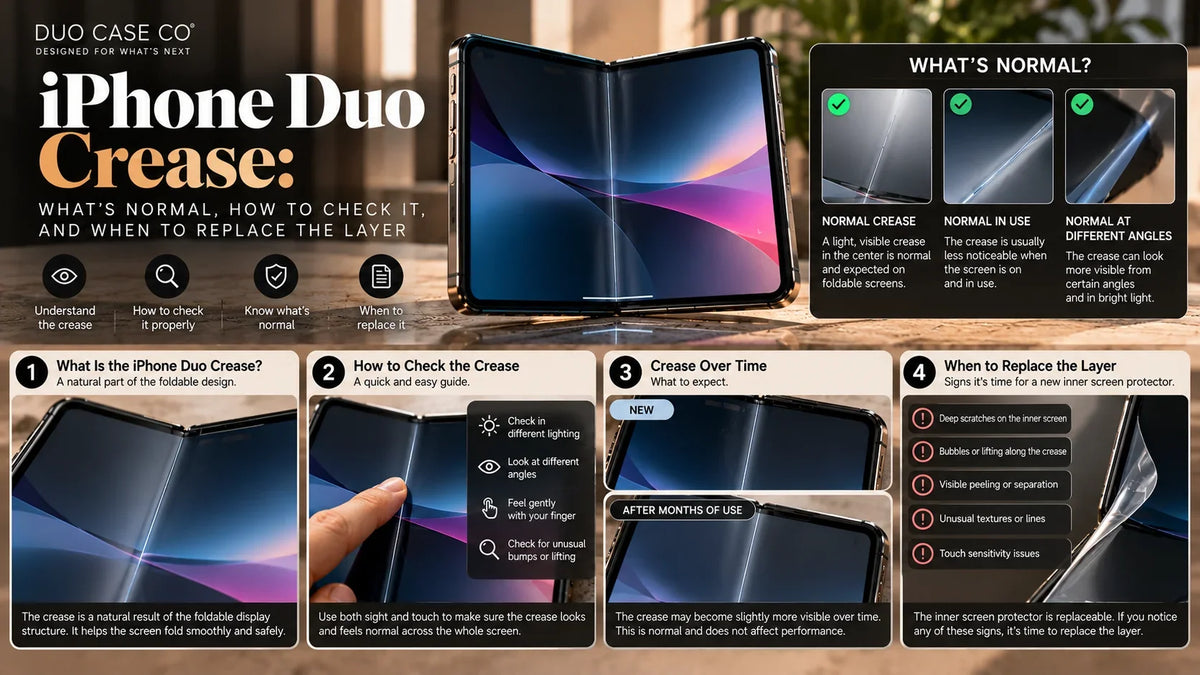
Every folding screen has a crease, and the iPhone Duo is no exception. Apple has done more than most to hide it: a nano-texture finish, adhesives that let the layers slide, and a cover layer you can have replaced.
But a new Duo owner tilting the screen under a lamp will still see a line down the middle. This guide explains why it’s there, what’s normal, how to tell when it isn’t, and how to keep it from getting worse.
- A faint line you see at an angle or in reflections is normal. Early hands-on reports say the Duo’s crease is still visible in some light but less distracting than on many foldables.
- See Apple if the cover layer lifts or bubbles, the line changes colour, or touch stops working along the fold.
- Never peel the layer yourself. Apple says it’s replaceable: $19 with AppleCare+ in the US.
- Keep it from getting worse: nothing between the halves when you close it, no pressing on the fold, a case that covers the hinge, and only flexible film on top.
Why every folding screen creases
A folding screen is a stack of thin layers: the display panel, a thin glass, adhesives and a top cover layer. When you fold it, the layers on the outside of the bend stretch and the layers on the inside compress. They don’t all bend by the same amount, so the stack never springs back perfectly flat. The result is a slight dip along the fold.
You can’t see a dip directly. What you see is light reflecting off it. That’s why the crease almost disappears when you look straight on at a bright image, and shows clearly when you tilt the phone under a ceiling light.
What Apple did about the iPhone Duo crease
- Nano-texture finish: a matte surface on the inner screen that scatters reflections. Apple says it minimises how visible the crease is and cuts glare.
- Adhesives that let layers move: Apple says the optically clear adhesives let the layers slide as the screen folds, reducing stress at the crease.
- Reinforced stack: high-strength glass and a titanium plate under the display, plus a polymer cover layer reported to be up to 40% stiffer than those on rival foldables.
- A hinge of more than 100 parts, designed for smooth, balanced resistance.
- A replaceable cover layer. Apple’s VP of hardware engineering, Kate Bergeron, said the layer is replaceable. If it wears or the crease becomes more visible over time, it can be swapped.
What Apple hasn’t said: how many folds the screen is rated for, or what a cover layer replacement costs without AppleCare+.
Why you see the crease more at some times than others
Crease visibility simulator
Illustrative. Change the conditions and see how visible the same crease becomes.
Light
Viewing angle: 0°
What’s on screen
Surface
The takeaway: if you only notice the crease when the screen is off, dark or tilted under a lamp, you’re seeing reflections off a normal fold.
What’s normal, and what isn’t
| You notice | Normal? | What to do |
|---|---|---|
| A faint line, visible at an angle or with the screen off | Normal | Nothing. It’s reflection off the fold. |
| A slight dip you can feel with a fingertip | Normal | Nothing. Don’t press on it to “test” it. |
| The line looks a bit more visible after months | Expected wear | Consider replacing the cover layer. |
| Bubbles, wrinkles or the layer lifting at an edge | Not normal | Stop folding it fully and contact Apple. |
| A coloured line, dead pixels or flicker along the fold | Not normal | Display issue. Contact Apple; it’s not the cover layer. |
| Touch not working along the fold | Not normal | Contact Apple. |
| A sharp ridge or bump, not a smooth dip | Not normal | Something may be trapped under the layer. Contact Apple. |
Is my iPhone Duo crease normal?
Crease checker
1. When can you see it?
2. Has it changed since you got the phone?
3. Any bubbles, wrinkles or lifting at the layer’s edges?
4. Any coloured lines, dead pixels, flicker or touch problems along the fold?
5. How does it feel under a fingertip (gently)?
Tip: take a photo of the crease in week one: same room, same lamp, same angle. If you ever think it’s getting worse, you’ll have something real to compare against, and something to show Apple.
How to keep the crease from getting worse
- Check the screen before you close it. A crumb, a grain of sand or an earbud between the halves is pressed into the fold by the whole hinge.
- Don’t press on the fold. No fingernail tapping, no stylus on the crease, no “testing” how deep it is.
- Protect the cover layer from scratches. Scratches on the layer catch light and make the fold look worse. A flexible film on top takes the wear instead. What’s safe on the inner screen.
- Never use tempered glass inside. Glass can’t fold; it cracks or lifts at the crease.
- Cover the hinge. A side-on drop on the spine is the most direct impact on the fold. Why the hinge needs protection.
- Mind the temperature. Apple specifies 0–35°C (32–95°F) for using iPhones. Screen layers stiffen in the cold, so let a cold phone warm up before you open it fully. Never leave it on a hot dashboard.
- Clean gently. Use a soft, dry, lint-free cloth. For its other nano-texture displays, Apple recommends only its Polishing Cloth, so avoid rough cloths and household cleaners.
Replacing the iPhone Duo cover layer
| What we know | |
|---|---|
| Is it replaceable? | Yes. Apple says the cover layer is designed to be replaced. |
| Cost with AppleCare+ (US) | $19 |
| Cost without AppleCare+ | Not published yet |
| Who replaces it | Not fully confirmed. Expect Apple or an authorised service provider. |
| When to replace it | When it’s scratched, worn, lifting, or the crease has become more visible |
| Can I peel it myself? | Don’t, until Apple publishes a do-it-yourself process. Peeling it wrong risks the display underneath. |
Frequently asked questions
Does the iPhone Duo have a crease?
Yes. Every folding screen has one. Apple uses a nano-texture finish, adhesives that let the layers slide and a reinforced display stack to minimise it. Early hands-on reports say it’s still visible in some light but less distracting than on many foldables.
Is a visible crease on a new iPhone Duo normal?
A faint line visible at an angle, in reflections or with the screen off is normal. Bubbles, lifting at the edges, coloured lines, dead pixels or touch problems along the fold are not; contact Apple about those.
Will the iPhone Duo crease get worse over time?
Apple hasn’t published a fold-cycle rating. The cover layer is designed to be replaced if it wears or the crease becomes more visible. Keeping things out from between the halves, not pressing on the fold and protecting the layer from scratches all help.
How much does it cost to replace the iPhone Duo cover layer?
$19 with AppleCare+ in the US. Apple hasn’t published the price without AppleCare+.
Can I peel off the iPhone Duo screen layer?
Don’t. Apple says the layer is replaceable, but hasn’t published a do-it-yourself process. Peeling it wrong can damage the display. Let Apple replace it.
Does a screen protector hide the iPhone Duo crease?
No. No film removes the fold’s dip, and a glossy film can make reflections more noticeable. A flexible film on top of Apple’s layer protects it from scratches so the crease doesn’t look worse over time.
Why is the crease more visible when the screen is off?
Because you’re seeing light reflecting off the dip, not the screen itself. A bright image overwhelms the reflection; a dark or blank screen shows it clearly.
Disclosure: Duo Case Co sells the screen protector and cases linked in this guide. iPhone Duo display and cover layer details are from Apple, as reported by MacRumors, ChannelNews, iPhone in Canada and HotHardware; the 40% stiffness figure is as reported. The simulator is illustrative. This guide isn’t a diagnosis; contact Apple about any display problem. Duo Case Co is an independent accessories company and is not affiliated with, sponsored by or endorsed by Apple Inc. iPhone and AppleCare are trademarks of Apple Inc.



Leave a comment
This site is protected by hCaptcha and the hCaptcha Privacy Policy and Terms of Service apply.